
Skip to content

  • Home
  • Articles
  • About Me
  • Contact me
  • CategoriesExpand
    • OktaExpand
      • Okta Device Access
  • Desktop Password Sync meets Platform SSO 2.0 and Workspace ONE
    Apple | macOS | Okta | Okta Device Access | Omnissa | Workspace ONE UEM

    Desktop Password Sync meets Platform SSO 2.0 and Workspace ONE

    ByArkadiusz Krowczynski January 16, 2026January 16, 2026

    Table of Contents Introduction Prerequisites Set up Device Access SCEP certificates Configure Okta as a CA for Device Access Download the x509 certificate from Okta Workspace ONE SCEP configuration Create a Certificate Authority Add a Certificate Template  Create a device profile to deploy the Okta CA  Create a user profile to deploy the Okta CA-issued client…
    Read More Desktop Password Sync meets Platform SSO 2.0 and Workspace ONEContinue

  • Desktop Password Sync meets Platform SSO 2.0 and Kandji
    Apple | Kandji | macOS

    Desktop Password Sync meets Platform SSO 2.0 and Kandji

    ByArkadiusz Krowczynski January 16, 2026January 16, 2026

    Table of Contents Introduction Prerequisites Set up Device Access SCEP certificates Configure Okta as a CA for Device Access Kandji SCEP configuration Verify that certificate was installed on device Update your Kandji Library profiles Platform SSO configuration profile Okta Verify configuration profile Introduction Support for Platform SSO 2.0 is available for macOS computers using Sonoma (14.0) and later.Platform…

    Read More Desktop Password Sync meets Platform SSO 2.0 and KandjiContinue

  • Okta Device Access macOS TOTP account link
    Apple | Intune | Jamf | Jamf Pro | Kandji | macOS | Okta | Okta Device Access

    Okta Device Access macOS TOTP account link

    ByArkadiusz Krowczynski January 16, 2026January 16, 2026

    Table of Contents Introduction Prerequisites Create / Adjust MDM Profiles Workspace ONE UEM Profile Jamf PRO Profile Kandji Profile Microsoft Intune Profile Introduction In Desktop MFA for macOS, admins can now choose between Okta Verify push notification and Okta Verify Time-based One-Time Password as the user verification method used to link an Okta account to the…

    Read More Okta Device Access macOS TOTP account linkContinue

  • Desktop Password Sync meets Platform SSO 2.0 and Microsoft Intune
    Apple | Intune | macOS | Microsoft | Okta | Okta Device Access

    Desktop Password Sync meets Platform SSO 2.0 and Microsoft Intune

    ByArkadiusz Krowczynski January 16, 2026January 16, 2026

    Introduction Support for Platform SSO 2.0 is available for macOS computers using Sonoma (14.0) and later.Platform SSO 2.0 allows Desktop Password Sync to be used directly from themacOS login window.In this blog, I will briefly describe the configuration steps required to use Okta Device Access with Platform SSO 2.0 and Microsoft Intune as your MDM solution. Prerequisites Before you start ensure that you meet…

    Read More Desktop Password Sync meets Platform SSO 2.0 and Microsoft IntuneContinue

  • Integrations | Okta | Omnissa | Workspace ONE UEM

    Okta secure devices Videos on IAMSE.blog

    ByArkadiusz Krowczynski January 11, 2026January 11, 2026

    Introduction Remote and hybrid work is here to stay, so are all your devices secured? In recent weeks and months, I’ve written various blogs on the topic endpoint integration and security.In this blog post, I would like to briefly demonstrate once again with some demos how Okta can help with this from enrollment to logging on to the device and accessing…

    Read More Okta secure devices Videos on IAMSE.blogContinue

  • Okta and VMware Horizon True SSO
    Horizon | IGEL | Integrations | Okta | Okta Device Access

    Okta and VMware Horizon True SSO

    ByArkadiusz Krowczynski January 11, 2026January 11, 2026

    Introduction This blogs covers a basic guide how to configure Okta and VMware Horizon to provide an end-to-end single sign on experience to the end-user .We need to have TrueSSO configured on our Horizon environment as this enable users are not required to also enter Active Directory credentials in order to use a remote desktop or applications. Prerequisites Configuring SAML Integration with…

    Read More Okta and VMware Horizon True SSOContinue

  • Okta Device Access – Desktop MFA for macOS
    Apple | Integrations | macOS | Okta | Okta Device Access | Omnissa | Workspace ONE UEM

    Okta Device Access – Desktop MFA for macOS

    ByArkadiusz Krowczynski January 11, 2026

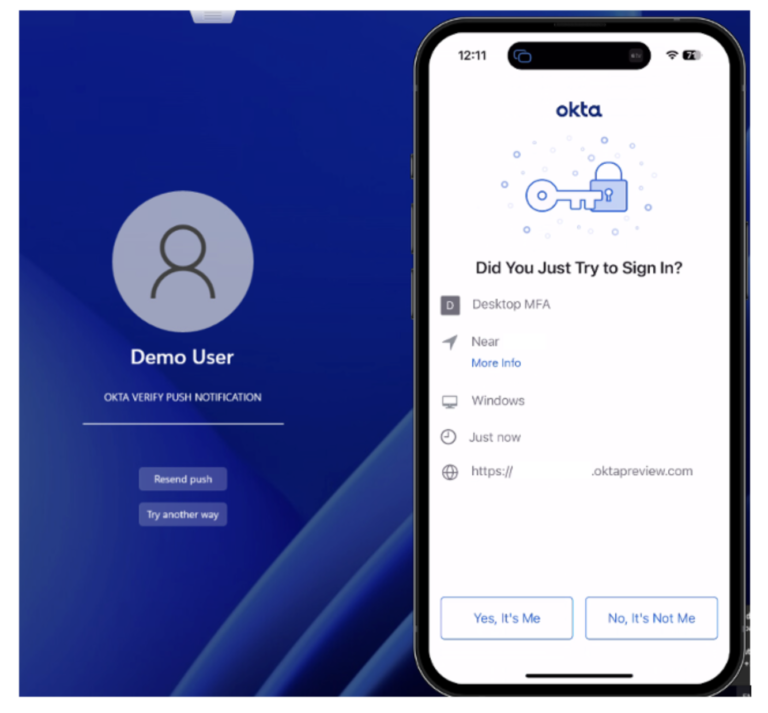
    Okta Desktop MFA for macOS adds an extra layer of security to the macOS sign-in process by asking users for additional authentication before allowing computer access. In this blog we show you how to configure Desktop MFA in the Okta Admin Console, and then deploy it through VMware Workspace ONE.  Technical Prerequisites Create and configure the Desktop MFA app integration In the Admin Console,…

    Read More Okta Device Access – Desktop MFA for macOSContinue

  • Okta Device Access – Desktop Password Sync for macOS
    Apple | Integrations | macOS | Okta | Okta Device Access | Omnissa | Workspace ONE UEM

    Okta Device Access – Desktop Password Sync for macOS

    ByArkadiusz Krowczynski January 11, 2026January 11, 2026

    October 2024: The Okta application name from “Desktop Password Sync” to“Platform Single Sign-On for macOS” April 2025: Additional app identifier required for the associated domain entry on macOS 15 Sequoia (mobileconfig template was updated) Introduction With macOS Ventura, Apple introduced Platform SSO, which enables developers to create a single sign-on (SSO) extension that interacts directly with the macOS login…

    Read More Okta Device Access – Desktop Password Sync for macOSContinue

  • Okta Desktop MFA for Windows
    Integrations | Okta | Okta Device Access

    Okta Desktop MFA for Windows

    ByArkadiusz Krowczynski January 11, 2026January 11, 2026

    The use ofOkta’s Desktop MFA for Windows strengthens the security of a user’sauthentication of Windows computers.This customizable solution is designed to configure the sign- in flow into a Windows workstation.This secured sign-in flow will prompt a user for multi-factor authentication after the username and password are entered and includes offline sign-in methods that can be…

    Read More Okta Desktop MFA for WindowsContinue

  • Enable Okta for VMware vCenter Server
    Integrations | Okta | VMware

    Enable Okta for VMware vCenter Server

    ByArkadiusz Krowczynski January 11, 2026

    In today’s security landscape, identity management and multifactor authentication (MFA) are crucial components. The latest release of vSphere, vSphere 8 Update 1, introduces support for cloud-based identity providers in vCenter, including the widely used Okta service. With this new capability, vSphere administrators can leverage modern identity management features for enhanced security and streamlined operations. Prerequisites Okta requirements: Okta connectivity requirements: vCenter…

    Read More Enable Okta for VMware vCenter ServerContinue

Page navigation

Previous PagePrevious 1 2 3 4 5 Next PageNext

© 2026 - blog.iamarki.ai - All rights reserved

  • Disclaimer
  • Legal Notice
  • Privacy Policy
  • Home
  • Articles
  • About Me
  • Contact me
Search